Saturday, September 9, 2017

Ponder Alliance 3rd Session at NED UET - Focus Group 3 Guest Speaker Session Presentation

Ponder Alliance has successfully organized 3rd session at NED UET Karachi. I have presented summary of discussion held in a previous session related to focus group 3 Guest Speaker Session. The presentation main points are as follows.

  • Guest speaker session observations 
  • Identified reasons and possible solutions
  • Proposed action plan

Further details in presentation slides.

[PRESENTATION LINK]


Monday, September 4, 2017

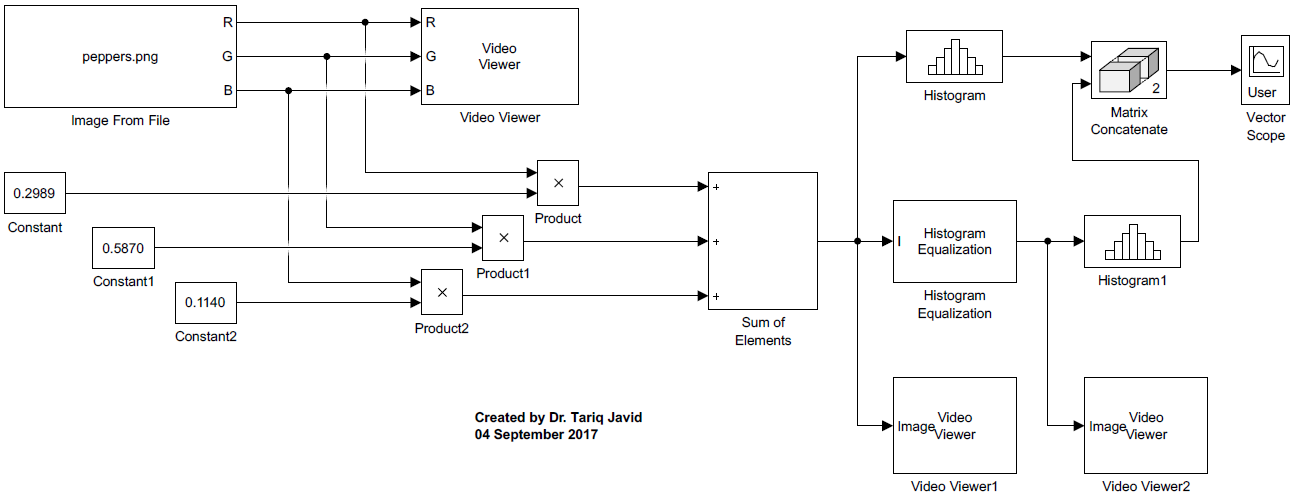
Histogram Equalization Implemented on MATLAB & Simulink

Today was finally paid off with the Simulink model that generated histogram equalized output. I started with the example model (Fig. 1). It appeared after typing ex_vision_find_histogram in command line of MATLAB 2016b.

Fig. 1 

Conversion to gray scale version was really time-consuming. After a couple of mistakes and few hours, I decided to do it as in Fig. 2. 


Fig. 2

The real challenge was to set 'Sample time' to 0.2 for 'Image From File' block. This information was not found in initial example in Fig. 1. Reading a couple of articles after Google search on error message was quite helpful to do error-and-trial that really worked. The input color image and gray scale image are in Fig. 3 and Fig. 4, respectively.

Fig. 3

Fig. 4

Histograms are shown in Fig. 5 and equalized image in Fig. 6. 

Fig. 5 Need to right click inside scope and select 'Autoscale'. 

Fig. 6

Do not forget errors that appeared in MATLAB command window, see Fig. 7. 

Fig. 7

Finally, the error which took most of time. It really deserve a treat -- regenerated in Fig. 8 to share learning of the day! How to fix? See Fig. 9. 

Fig. 8

Fig. 9

How I figured it out? Really! Fig. 10 explains it. 

Fig. 10

Experience on Travelling Two Way Road to Hamdard University


The video below adds new experience to an earlier adventurous version. This video is dated 30 August 2017 whereas the earlier adventurous video was taken on 18 April 2015.

[Video Link]


[Link to the Older Post] A Real 4D Motion Ride Experience

Monday, July 24, 2017

How to read DICOM in R with oro.dicom?

The steps are as follows (require Internet connectivity).

  • Right-click at R icon and select Run as Administrator.
  • From Packages drop down menu select Install package(s)...
  • Select oro.dicom, oro.nifti, and oro.pet from packages and press OK button
  • Wait installation to finish successfully
Screenshots of steps are as follows. 


The following lines appear after successful installation.

package ‘Rcpp’ successfully unpacked and MD5 sums checked

package ‘bitops’ successfully unpacked and MD5 sums checked
package ‘abind’ successfully unpacked and MD5 sums checked
package ‘RNifti’ successfully unpacked and MD5 sums checked
package ‘oro.dicom’ successfully unpacked and MD5 sums checked
package ‘oro.nifti’ successfully unpacked and MD5 sums checked
package ‘oro.pet’ successfully unpacked and MD5 sums checked

Few commands are executed in R from Using oro.dicom PDF file from website https://cran.r-project.org/web/packages/oro.dicom/index.html. The Abdo.dcm file is in r-release oro.dicom Windows binaries zip archive.  

getwd()
library(oro.dicom)
fname <- system.file(file.path("dcm", "Abdo.dcm"), package="oro.dicom")
abdo <- readDICOMFile(fname)
names(abdo)
head(abdo$hdr)
tail(abdo$hdr)
extractHeader(abdo$hdr, "BitsAllocated")
extractHeader(abdo$hdr, "Rows")
extractHeader(abdo$hdr, "Columns")
image(t(abdo$img), col=grey(0:64/64), axes=FALSE, xlab="", ylab="")

The output of last command is pasted below.


I have encountered error when working with .dcm images provided in MATLAB. Following error message appears on execution of commands in R.

> fname <- system.file(file.path("dcm", "knee1.dcm"), package="oro.dicom")
> abdo <- readDICOMFile(fname)
Error in readBin(fname, "raw", n = as.integer(fsize), endian = endian) : 
  can only read from a binary connection 

Still working on...

Citation from source:
Brandon Whitcher, Volker J. Schmid, Andrew Thornton (2011). Working with the DICOM and NIfTI Data Standards in R. Journal of Statistical Software, 44(6), 1-28. URL http://www.jstatsoft.org/v44/i06/.


Friday, April 21, 2017

A faculty training session on service excellence was held at Hamdard University

A faculty training session on service excellence was held at Hamdard Institute of Engineering & Technology, Hamdard University, Karachi Campus on 20 April 2017. The main points covered during session are as follows. [PRESENTATION]

  1. What is service excellence and why it is important?
  2. Basic concepts and fundamentals
  3. Learn 8-keys of excellence:
    • Integrity
    • Failure leads to success
    • Speak with good purpose
    • This is it!
    • Commitment
    • Ownership
    • Flexibility
    • Balance


Wednesday, December 21, 2016

Hamdard University 2016 SCONEST & HU STEM

Hamdard University has organized 5th IEEE Student Conference on Engineering Sciences and Technology (SCONEST 2016) along with 1st Hamdard University Science Technology Engineering and Mathematics (HU STEM 2016) Research Symposium. I was assigned the job of Conference Secretary for SCONEST 2016. It was a great opportunity and nice experience. In the opening session at Bait al-Hikmah Auditorium on December 14, 2016 snap below (from left) Prof. Dr. Manzoor Hussain Soomoro (at Podium), President ECO4Science Foundation and Chief Guest, Dr. Tariq Javid (myself), Prof. Dr. Pervez Akhtar, Director HIET and Conference Co-Chair, Prof. Dr. Hk. Abdul Hannan, Vice Chancellor and Conference General Chair, Engr. Irfan Ahmad, Advisor on Renewable Energy China Hydro Power Project, Prof. Dr. Vali Uddin, Dean FEST and Conference Chair, and Mr. Ali Suleman, Chair IEEE HIET Student Branch.

Saturday, December 17, 2016

How to write and present your work?

The presentation [LINK] is delivered on Friday December 2, 2016 at Hamdard Institute of Engineering & Technology (HIET), Hamdard University. The presentation focus on use of simple and direct English language to write and present research work.