Saturday, October 21, 2023

BME Students and Faculty Attended Conference on Medical Devices at 20th Health Asia

Friday 20 October 2023

BME students and faculty members attended the Conference on Boosting Medical Devices Export-Led Development in Pakistan on Friday 20th October 2023 at the 20th Health Asia Exhibition at Karachi Expo Center. The event was organized by the Samane Shifa Foundation. Prof. Dr. Tariq Javid, Dr. Muhammad Faris, Mr. Khalid, Mr. Waleed, and Mr. Ahsan. 


20th Health Asia at Karachi Expo Center 19 - 21 October 2023

Friday 20 October 2023

BME faculty and students at 20th Health Asia at Karachi Expo. The event was held from 19 to 21 October 2023. Prof. Dr. Tariq Javid, Engr. Muhammad Faris, Mr. Khalid, Mr. Waleed, and Mr. Ahsan attended the event. I met Dr. Amjad, MUET and NED UET colleagues; and HU BME alumni Engr. Osama Amjad. 


Thursday, October 19, 2023

First Simulation CFD OpenFOAM

Thursday 19th October 2023

I spent almost a full day going through the first simulation elbow in tutorials. The directory name elbow was copied in the same folder and renamed as elbow_tri. The 'elbow.msh' file was copied from the tutorials resources directory and the Allrun script was updated. The endTime value set to 75 in the controlDict file inside the system directory.   


Acknowledgment

YouTube video: How to run your first simulation in OpenFOAM by József Nagy


Saturday, October 14, 2023

Getting Started with OpenFOAM

15 October 2023

I have spent almost over a week figuring out how to install and run OpenFoam. The getting started phase is now available in this post.

> Setup:  

   OpenFoam version 2306 

   Windows 11 with WSL (Windows Subsystem for Linux)

   ParaView 

> Installation Steps:

# Use Windows Power Shell in Admin Mode to install WSL

wsl --install

# Run wsl and Add the repository

curl https://dl.openfoam.com/add-debian-repo.sh | sudo bash

# Update the repository information

sudo apt-get update

# Install preferred package. Eg,

sudo apt-get install openfoam2306-default

# Install the ParaView 

sudo apt-get install paraview

> Configuration Steps:

# Modify /home/<user>/.bashrc by including the following line at the end

. /usr/lib/openfoam/openfoam2306/etc/bashrc

# Copy tutorials to $FOAM_RUN folder, you need to create the folder first 

/home/<user>/OpenFOAM/<user>-v2306/run

> First Simulation 

. Type wsl and enter in Search

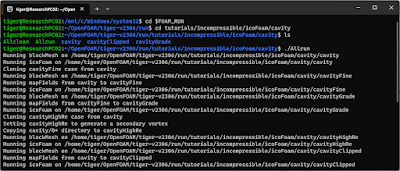
. Change directory to $FOAM_RUN/tutorials/incompressible/icoFoam/cavity

. Execute the command to generate results: ./Allrun 


. Make sure the directory is correct as in the following figure. 
. Execute the openfoam2306 
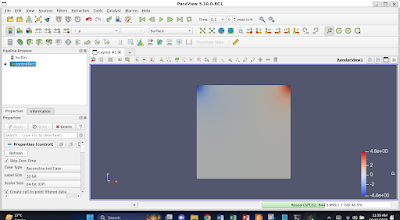
. Execute the paraview & 


. Open the controlDict from ParaView 


. Select the OpenFOAM Reader from the list and then press OK button
. Press the Apply button from the left pane of the ParaView


Wednesday, September 13, 2023

Arduino RESET Circuit Simulation

Wednesday 13th September 2023

The Arduino Mega RESET circuit simulation was created on Wokwi. It was really fun! Game. 


Tuesday, September 12, 2023

HU FEST FDP Session on Catalyzing Innovation theIEEE Empowerment

Tuesday 12th September 2023

The faculty development session, "Catalyzing Innovation theIEEE Empowerment," was held at the HU FEST Conference Room. Dr. Muhammad Faisal Khan, Associate Professor & Manager FEST ORIC was the resource person. Dr. Maria, Coordinator FDP welcomed the participants. After Tilawat-e-Quran by Engr. Majid, the session formally began with an activity linking problems to solutions. The main point explained by the resource person with the case study and numerous examples was the availability of IEEE funds to address the various challenges faced by society. As I had to attend the Academic Council Meeting at the BAH Board Room, therefore; I left the session a few minutes before the session was completed.   


OLED Display Interfacing with Arduino Mega through I2C

Tuesday 12th September 2023

The connections in the screenshot worked with the OLED display. The simple code setup is provided as well.